What Are Ethernet Cable Categories?
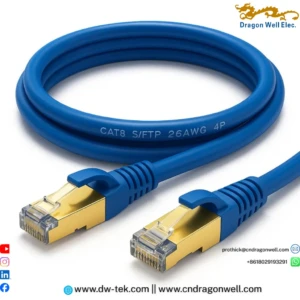
Ethernet cable categories (Cat5, Cat5e, Cat6, Cat6a, Cat7, Cat8, etc.) are performance ratings that define how much bandwidth and speed a twisted-pair copper cable can support, as well as how far that signal can travel.
Each new generation has improved on the previous one with higher frequencies (MHz), better control of crosstalk and noise, and support for faster Ethernet standards:
- Higher frequency → more bandwidth
- Better shielding and construction → less interference
- Improved data rate → higher speeds such as 1G, 10G, 25G and 40G
Understanding these Ethernet cable categories helps you avoid bottlenecks, reduce latency, and delay expensive re-cabling projects.
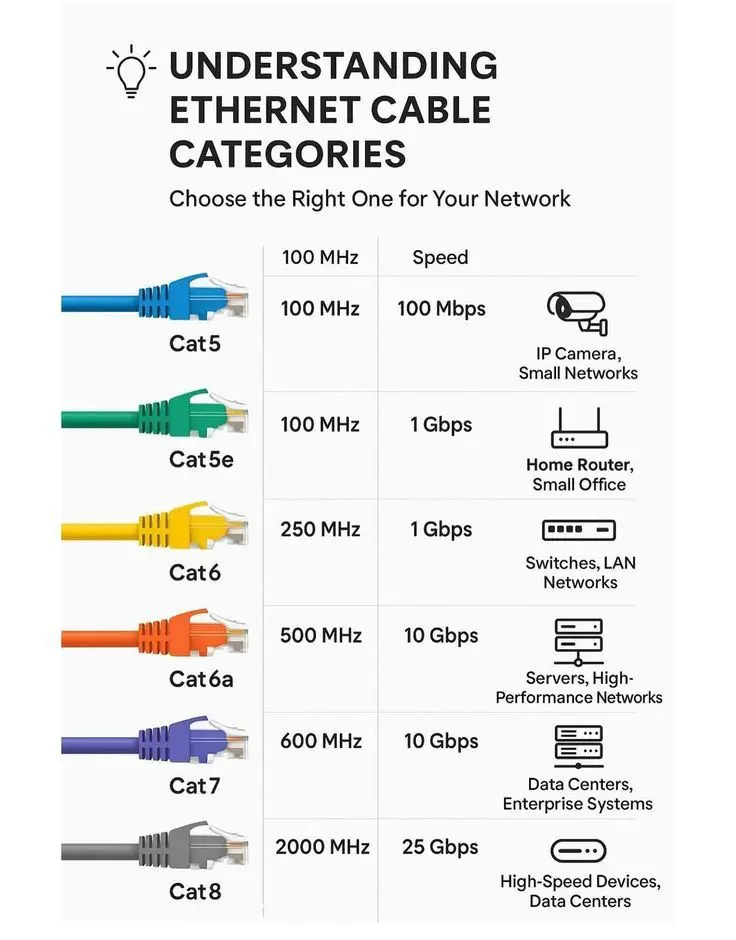
Quick Overview of Ethernet Cable Categories (Cat5 to Cat8)
Below is a simplified view of the most commonly used Ethernet cable categories and what they’re good for. Specs are typical values for 100 m permanent links or shorter runs.
Cat5 – Legacy Fast Ethernet
- Frequency: 100 MHz
- Speed: up to 100 Mbps
- Typical use: older IP cameras, legacy small networks
Cat5 is largely obsolete for new installs. It can still run basic Fast Ethernet, but it’s a limiting factor in modern networks.
Cat5e – Enhanced 1G Workhorse
- Frequency: 100 MHz
- Speed: up to 1 Gbps at 100 m
- Typical use: home and small-office networks
Cat5e is still widely used and good enough for many home and office applications where 1G is sufficient.
Cat6 – Entry to High-Performance
- Frequency: 250 MHz
- Speed: 1 Gbps at 100 m, 10 Gbps up to ~55 m depending on installation
- Typical use: office LANs, small server rooms
Cat6 offers more headroom than Cat5e and is a solid baseline for new commercial installations.
Cat6a – 10G Over 100 Meters
- Frequency: 500 MHz
- Speed: 10 Gbps up to 100 m
- Typical use: hospitals, universities, high-density Wi-Fi and enterprise networks
Standards like Cat6a were created specifically to deliver 10G Ethernet with better crosstalk control over full channel distance.
Cat7 – Shielded for Noisy Environments
- Frequency: 600 MHz (often higher in practice)
- Speed: typically 10 Gbps
- Construction: fully shielded pairs with overall shielding
- Typical use: data centers, high-performance and industrial networks
Cat7 isn’t part of the TIA standard but is widely used in Europe and high-noise environments thanks to its heavy shielding.
Cat8 – Short-Reach 25G/40G
- Frequency: up to 2000 MHz
- Speed: 25–40 Gbps up to ~30 m
- Typical use: top-of-rack switching and data centers
Cat8 provides a copper alternative to short fiber runs inside racks and rows, ideal where ultra-high-speed links are needed over limited distances.
6 Essential Tips to Choose the Right Ethernet Cable Category
Choosing among Ethernet cable categories is easier when you follow a simple checklist.
1. Match the Cable to Your Network Speed
- For basic web, email and light streaming, Cat5e is usually enough.
- For multi-user offices or heavy file transfers, aim for Cat6 or Cat6a.
- For 10G edge switches or aggregation links, Cat6a is the recommended minimum.
- For 25G/40G short links in data centers, Cat8 may be appropriate.
Your cable should never be the slowest part of the chain.
2. Consider Future Upgrades
Cables are harder to replace than switches or access points, so it’s smart to “over-spec” slightly:
- Renovating an office ceiling or running conduits? Pull Cat6a even if you only need 1G today.
- Building a new data hall? Evaluate Cat7/Cat8 plus fiber to support future topologies.
This aligns with recommendations from structured cabling vendors who see Cat6a as a good default for new enterprise builds.
3. Think About Environment: Home, Office or Industrial
- Home / small office: Unshielded Cat5e or Cat6 is usually fine in low-noise environments.
- Enterprise / Wi-Fi dense office: Cat6 or Cat6a with good installation practices.
- Industrial / outdoor / noisy plant: Shielded Cat6a or Cat7, or rugged industrial Ethernet cables rated for temperature, chemicals and mechanical stress.
4. Check PoE Requirements
If you’re powering IP cameras, access points or IoT devices via Power over Ethernet, choose a cable category and construction that handles the current and heat:
- Cat5e supports basic PoE,
- Cat6 and Cat6a are preferred for higher PoE classes thanks to lower resistance and better thermal performance.
Look for PoE-rated cables from industrial and enterprise vendors.
5. Decide on Shielded vs Unshielded
Shielded twisted pair (STP/FTP) cables reduce interference but require proper grounding. Unshielded twisted pair (UTP) is simpler and cheaper.
- Use UTP in typical offices and homes with low EMI.
- Use STP/FTP near heavy machinery, radio equipment, or dense cable trays in data centers.
6. Don’t Forget Distance Limits
All copper Ethernet cable categories have distance limits—normally 100 m for Cat5e through Cat6a and shorter (around 30 m) for Cat8 at its highest data rates. If you need longer runs, consider fiber or active copper solutions.
Example Scenarios: Which Ethernet Cable Category Should You Use?
Home Streaming & Gaming
- Recommended: Cat5e or Cat6
- Why: Affordable, easy to find, and supports gigabit Internet plus 4K streaming for most households.
Growing Small Office
- Recommended: Cat6 for desktops, Cat6a for backbone links
- Why: Balances cost with performance and leaves room for future upgrades.
Enterprise Campus & Wi-Fi 6/6E
- Recommended: Cat6a for new horizontal cabling
- Why: Supports 10G uplinks for high-density access points and aggregation switches.
Industrial Automation & IIoT
- Recommended: Shielded Cat6a/Cat7 or rugged industrial Ethernet cables
- Why: Improved noise immunity and robust jackets for harsh conditions.
Data Center Top-of-Rack
- Recommended: Cat6a for 10G, Cat8 for short 25/40G links where copper is preferred
- Why: High throughput within limited distances, especially between servers and ToR switches.
Why Work with Dragon Well for Your Ethernet Connectivity
Global brands like Amphenol, Molex, Samtec and FS provide comprehensive ecosystems of category cables, patch cords and interconnects used in networks worldwide.
Dragon Well Electronics focuses on connectors, ports and assemblies that integrate seamlessly with these Ethernet cable categories—from RJ45 jacks and keystone modules to board-level connectors and custom harnesses. By matching plating, pinouts and packaging 1:1, we help OEMs and integrators build cost-effective, reliable copper links tailored to their exact applications.
Order & RFQ
Need samples or a cost-down cross-reference for your Ethernet cable categories project or matching RJ45 connectors? Share your BOM or drawing and we’ll match plating and packing codes 1:1.
- Websites: cndragonwell.com | dw-tek.com
- Email: prothick@cndragonwell.com
Connect with Us
Stay up to date with new Ethernet connectivity solutions, application notes and product launches: