What Is HDMI vs VGA?
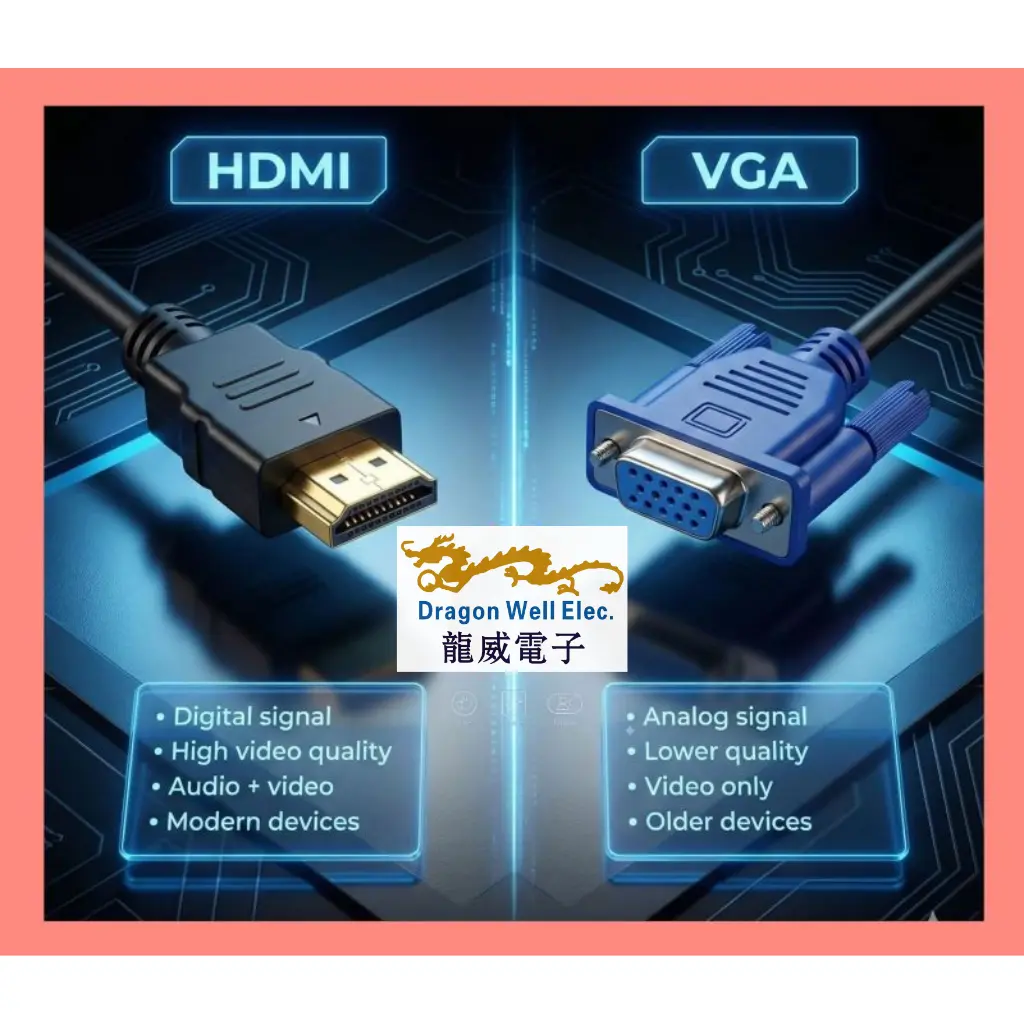
HDMI vs VGA is a comparison between two popular display connections used to link a PC, laptop, set-top box, or industrial device to a monitor, TV, or projector.
- HDMI is a digital interface designed for modern video (and often audio) transmission.
- VGA is an analog interface known for legacy compatibility, widely found in older projectors, monitors, and industrial systems.
Understanding HDMI vs VGA helps you pick the right cable, avoid blurry images, reduce signal problems, and ensure your device supports the display you’re connecting.
Quick Overview of HDMI vs VGA
Below is a simplified view of HDMI vs VGA and what each connection is best for.
HDMI — Modern Digital Video (Often Audio Too)
Signal type: Digital
Supports: High video quality, modern displays, many devices
Audio: Usually supported in the same cable
Typical use: TVs, new monitors, laptops, media players, digital signage
HDMI is preferred for clarity because digital signals are less sensitive to noise when compared to analog.
VGA — Legacy Analog Video
Signal type: Analog
Supports: Older displays and projectors
Audio: Not included (needs separate audio cable)
Typical use: legacy monitors, older projectors, industrial panels, service displays
VGA still matters when compatibility is required—especially in older installations where upgrading all equipment is expensive.
7 Essential Tips to Choose Between HDMI vs VGA
1) Start with Digital vs Analog Video
The biggest difference in HDMI vs VGA is signal type:
- HDMI = digital video
- VGA = analog video
Digital usually delivers a sharper picture with more stable quality across normal cable lengths.
2) Choose HDMI for Better Image Clarity
If you want clean text, sharper edges, and better visuals for modern displays, HDMI is usually the better option. VGA can look softer because analog signals degrade more easily.
3) Check If You Need Audio in the Same Cable
One practical HDMI vs VGA decision point is audio:
- HDMI typically carries audio + video together
- VGA carries video only (audio needs a separate cable)
If you’re connecting to a TV or a presentation system and you need audio, HDMI is more convenient.
4) Confirm Device Compatibility (Especially Projectors)
Many meeting rooms still use older projectors that only have VGA. If the display only accepts VGA, then VGA is necessary unless you use an adapter.
In HDMI vs VGA, compatibility sometimes decides everything.
5) Consider Cable Length and Signal Stability
Analog signals (VGA) are more likely to degrade with longer cable runs or electrical noise, leading to ghosting, blur, or color shift. HDMI is generally more stable across typical office lengths.
If your setup involves longer runs, plan carefully and choose quality cables and connectors.
6) Use Adapters the Right Way (HDMI ↔ VGA)
HDMI and VGA are different signal types. Most HDMI-to-VGA setups require an active converter (not just a passive plug) because you’re converting digital to analog.
Tip: when a user asks why HDMI-to-VGA “doesn’t work,” it’s often because the adapter is passive or the device output doesn’t support conversion.
7) Think About Your Environment: Office, Education, Industrial
- Office / home / modern devices: HDMI is usually the default choice
- Schools / older projectors: VGA is still common
- Industrial / long-life equipment: VGA remains in many systems due to legacy panels and fixed installations
This is why the HDMI vs VGA topic continues to matter: the world still runs mixed-generation equipment.
Example Scenarios: Which One Should You Use?
Modern Laptop to Monitor/TV
Recommended: HDMI
Why: digital signal, better clarity, supports audio in one cable
Meeting Room with an Older Projector
Recommended: VGA (or HDMI-to-VGA active adapter)
Why: many older projectors are VGA-only
Digital Signage Player to Display
Recommended: HDMI
Why: stable high-quality digital video for continuous operation
Industrial PC to Legacy Panel Display
Recommended: VGA
Why: legacy compatibility is often required in industrial environments
Why Work with Dragon Well for HDMI & VGA Connectivity
In real installations, performance depends not only on the cable type, but also on the connector quality and mechanical stability. Dragon Well Electronics supports connector and interconnect solutions that help OEMs build stable devices for both modern and legacy requirements.
We support projects with:
- HDMI-related connectivity components (board-level interconnects and assemblies depending on design needs)
- Legacy interface support for long-life systems
- PCB connectors / headers for display control boards and interface modules
- Custom matching support for packaging, mounting, and production requirements
Internal links to add (examples on your website):
- USB connectors (for modern devices and hubs)
- Board-level headers/connectors (for interface boards)
- RJ45 connectors (for networking + digital signage systems)
Order & RFQ
Need connector support for display-interface products, legacy compatibility projects, or cable/assembly matching?
Websites: cndragonwell.com | dw-tek.com
Email: prothick@cndragonwell.com
Connect with Us
LinkedIn: https://www.linkedin.com/company/dragon-well-electronics-co-ltd
Instagram: https://www.instagram.com/dragonwell_electronics
Facebook: https://www.facebook.com/DragonWellElectronics